


Your Food - No Waste Inventory
4.7152.00 Reviews
App Specs
- Version
- 3.1.0
- Updated On
- License
- Free
- Downloads
- 50,000+
- Developer
- Harderue
- Categories
- Food & Drink
- Platform
- Android
Screenshots
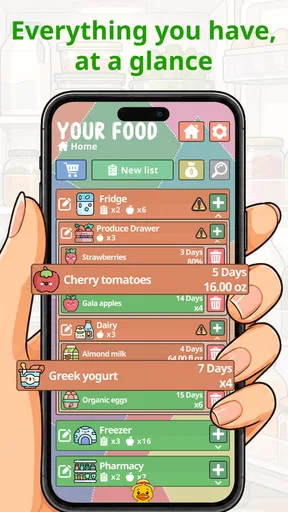
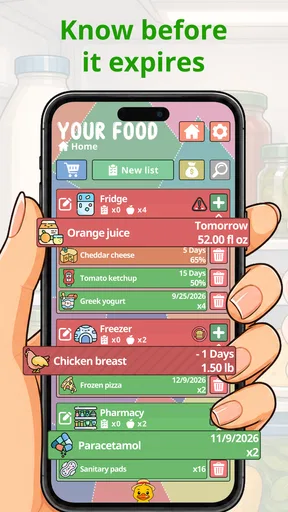
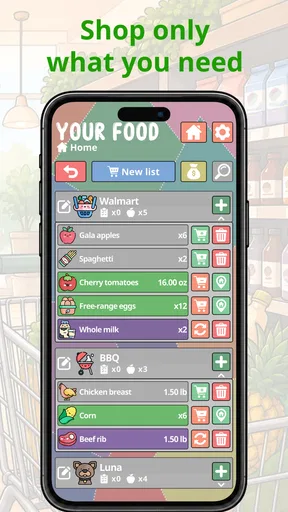
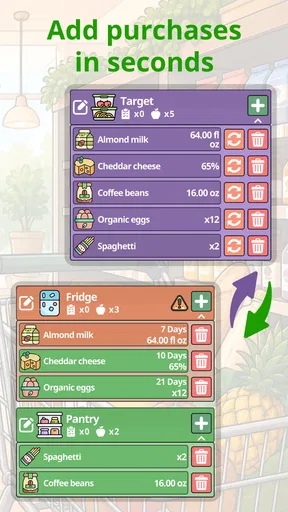
 Analysis by AppCompare
When several people share a kitchen, the hard part is often not deciding what to buy; it is remembering what is already there. I find a pantry inventory most useful when everyone can check it before shopping and someone has a simple way to keep it current. Your Food - No Waste Inventory is built around that practical problem, combining food tracking with reminders and shopping organization rather than treating the kitchen as a collection of recipes.
One kitchen, several routines
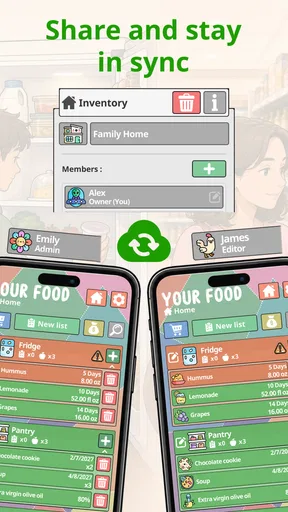
Picture a shared household on a weekday evening: one person is heading home and can stop at the shop, while another is planning dinner. A quick look at the inventory can help them avoid buying a second carton of milk or overlooking vegetables that should be used soon. That kind of coordination is where a dedicated food app can be more useful than a note on the fridge, provided the people in the household actually keep the list updated.
The useful habit is to add groceries as they come through the door, rather than trying to reconstruct the whole kitchen later. I’d also treat dates as prompts to check an item, not as an automatic guarantee that food is safe or spoiled. A reminder can make a forgotten ingredient visible; judgment about freshness and safe handling still belongs to the person using it.
Set boundaries before sharing
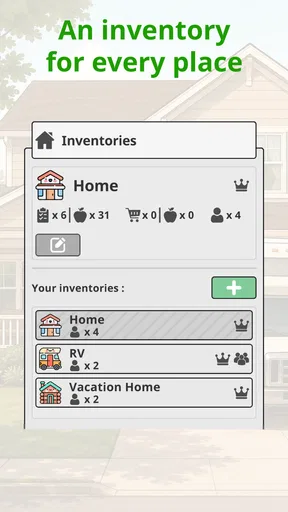
For a household, it helps to agree on what belongs in the shared inventory. You might track common staples, refrigerated food, and freezer items together, while leaving personal snacks or individually managed groceries out. That small boundary prevents a list from becoming a record of every food preference in the home, and makes it easier for someone else to find what matters when they are shopping.
The app is free to get started, with in-app purchases listed at $7.99 per item. I’d check the available options in the app before relying on a paid feature for a household routine. Its description highlights sharing and syncing, but I would not assume that this creates separate household accounts or controls over who can edit what. Decide what information you are comfortable keeping in a shared tool, and make sure everyone understands how the list is meant to be used.
Who will get the most from it?
I think this suits people who shop for a household, cook from ingredients already on hand, or regularly lose track of food tucked behind newer groceries. It can also help someone living alone who wants a reliable view of pantry and freezer supplies. At a 4.7 average from around 700 ratings, it has drawn a favorable response, though any inventory app still depends on the user’s willingness to record what comes in and what gets used.
It may be less appealing if you want a completely automatic kitchen tracker or dislike maintaining lists. Scanning can speed up entry, but it does not remove the need to check that an item is right and add details when needed. Someone who only wants a bare shopping checklist may find a basic notes app quicker, while a household looking for shared visibility and reminders has more reason to use a purpose-built food inventory.
Worth Reading Before You Choose

Flipboard Shows What News Apps Must Do Beyond the Feed

Switching to Android Auto Means Rethinking Your Driving Routine

Google Calendar Makes a Crowded Week Easier to Manage

Ludo King Makes the Most of the Minutes Between Plans

Baby Panda World Brings Quick Play to Modern Phones, but Its Game Library Feels Busy

ESPN’s Live Game View Makes Following Close Games Easier
A Handy Kitchen Companion
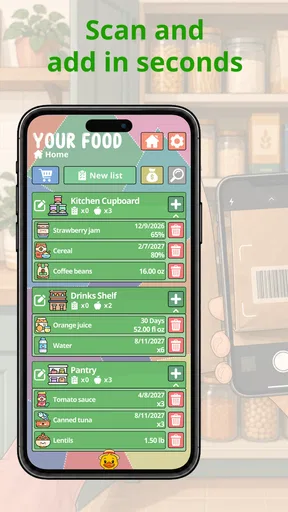
The first thing I noticed when I launched the app was its clean and user-friendly interface. It’s like having a virtual assistant right in your kitchen. Setting up the app was a breeze. You start by adding your food items, which you can do manually or by scanning barcodes. I found the barcode feature pretty nifty—it’s quick and saves you from typing out long product names.
Once you’ve added items, Your Food - No Waste Inventory lets you organize them by category. You can easily check what’s in your pantry, fridge, or freezer. The app even lets you set expiration dates, so you get reminders before anything goes bad. No more tossing out forgotten yogurt cups!
Features That Stand Out
One of the standout features for me is the recipe suggestion tool. Based on the ingredients you have, the app suggests recipes you can whip up. It’s like having a personal chef who knows exactly what’s in your kitchen. I tried a couple of recipes, and they turned out surprisingly good!
The app also has a meal planning feature. You can plan your meals for the week, which not only helps reduce food waste but also saves you from those "What’s for dinner?" dilemmas. Plus, there’s a shopping list feature that syncs with your inventory, so you don’t end up buying duplicates of things you already have.
Keeping it Green and Lean
Another thing I love about this app is how it promotes sustainability. The developers are clearly committed to reducing food waste, and it shows in every aspect of the app. There’s even a section with tips on how to store food properly and make it last longer.
For those who are environmentally conscious, it offers insights into how much food you’re saving from going to waste. It’s a great way to feel good about making a positive impact on the planet.
Room for Improvement?
Of course, no app is perfect, and there are a couple of areas where this one could improve. I found the barcode database to be a bit limited. Some of the items I tried to scan weren’t recognized, which meant I had to enter them manually. Also, while the recipe suggestions are great, it would be awesome to have a wider variety of cuisines represented.
But honestly, these are minor quibbles. The app is regularly updated, and I have a feeling the developers are working hard to expand its features.
Final Thoughts
All in all, Your Food - No Waste Inventory is a fantastic tool for anyone looking to reduce food waste and streamline their meal planning. It's practical, easy to use, and makes your kitchen feel just a bit more high-tech. Plus, who doesn’t love an app that helps you save money and the planet at the same time?
If you're tired of throwing away food and want a more organized kitchen, I highly recommend giving this app a try. Download it, start tracking, and watch as your food waste reduces and your meals become more efficient and creative. Happy cooking!
Everyday coordination that lasts
For a shared kitchen, the shopping list works best when it becomes the single place to record things that have run out. One practical approach is to check the inventory before leaving, add only the missing items, and then update the quantities or remove items as groceries are used. This avoids the familiar problem of a list that says “tomatoes” without making clear whether anyone already bought them. The trade-off is that the routine needs a clear owner: if nobody removes finished items, even a good list gradually becomes unreliable.
Barcode scanning can make stocking up faster, but I would not build the whole workflow around it. When a package is not recognized, manual entry is a reasonable fallback; for loose produce or leftovers, a short, recognizable label may be more useful than a precise product name. A quick household convention—such as naming leftovers by dish and adding a date—can make later checks much clearer without turning inventory entry into a chore.
Reminders, trust, and age context
The app is rated for Everyone, so its subject matter is suitable for a broad audience. In a family kitchen, though, I would still keep the responsibilities simple and age-appropriate: an adult can decide how dates and food safety are handled, while younger household members can help identify items or add straightforward groceries. That is a household practice, not a reason to assume the app includes special family permissions or child-specific settings.
Reminders are most helpful when they support a plan rather than create noise. I would set dates for foods that are easy to forget, then use the prompt to decide whether to cook, freeze, or otherwise use the item. Tracking every condiment and long-lasting staple may add more upkeep than value. Starting with foods that tend to be wasted—opened dairy, produce, and leftovers—is a more manageable way to see whether the system fits your routine.
Choosing the right level of organization
Compared with a paper list or a note-taking app, this is a more focused option because inventory, dates, meal planning, and shopping are meant to work together. Compared with a highly detailed spreadsheet, it should feel less like maintaining a database and more like checking a kitchen aid. Neither alternative is automatically worse: paper can be faster for one shopper, and a spreadsheet may suit someone who wants custom fields and enjoys managing them. The advantage here is having food-related tasks gathered in one place; the cost is keeping that shared record accurate.
Harderue is the developer, and the app’s current version is 3.1.0. It was released on October 27, 2021, and supports devices running Android 6.0 or later. It is a free app, though in-app purchases are available at $7.99 per item. It has more than 50,000 installs and 148 written reviews alongside its ratings, which gives a prospective user a sense that it has found an audience without making popularity a substitute for trying the workflow yourself.
My household verdict
I would recommend giving it a try if your household repeatedly buys duplicates, forgets food at the back of the fridge, or wants meal planning to begin with ingredients already available. To make the trial fair, enter a manageable group of groceries first, set a few useful reminders, and ask everyone who shops to check the shared list. If keeping that information current feels natural after a short while, expand it to more shelves and meal planning.
If your main need is a quick one-person checklist, a basic notes app may be simpler. If your household expects every item to appear automatically or needs detailed account-level control, this may not be the right fit. For people willing to maintain a lightweight record, though, Your Food - No Waste Inventory brings several useful kitchen jobs together. I like it most as a practical coordination tool: not a substitute for common sense or a perfectly self-updating pantry, but a way to make food already at home easier to notice and use.
Pros
- Easy tracking of food inventory.
- Reduces food wastage significantly.
- User-friendly interface design.
- Customizable notifications for expiry.
- Supports multiple languages.
Cons
- Limited offline functionality.
- Requires account creation to use.
- Occasional sync issues reported.
- Limited integration with smart devices.
- No option for voice commands.
FAQs for Your Food - No Waste Inventory
How does Your Food - No Waste Inventory help reduce food waste?
Your Food - No Waste Inventory helps reduce food waste by allowing users to track the expiry dates of their groceries. The app sends notifications to remind you of items nearing expiration, helping you consume them in time. It also offers meal planning suggestions based on the ingredients you have, ensuring that nothing goes to waste.
Is Your Food - No Waste Inventory easy to use for beginners?
Yes, Your Food - No Waste Inventory is designed with user-friendliness in mind. Its intuitive interface allows beginners to easily input their groceries, set up notifications, and access meal suggestions. The app includes a user guide and support options to assist new users in navigating its features efficiently.
Can I use Your Food - No Waste Inventory for multiple household members?
Absolutely! Your Food - No Waste Inventory allows you to create shared lists and inventories with multiple household members. This feature ensures that everyone in the household is aware of the available groceries and expiry dates, facilitating better coordination and reducing duplicate purchases.
Does Your Food - No Waste Inventory work offline?
Yes, Your Food - No Waste Inventory offers offline functionality. You can add and manage your inventory without an internet connection. However, certain features like syncing between devices and receiving real-time updates require an internet connection to function effectively.
Are there any subscription fees for using Your Food - No Waste Inventory?
Your Food - No Waste Inventory offers a free version with essential features. For more advanced features, such as personalized meal plans and extended storage tracking, there is a premium subscription available. The app provides a free trial period for users to explore these premium features before committing.


